Since last Monday, I have been working on building a website with WordPress, and it took me six days. I would like to share some resources and information for anyone who starts out.
* You will encounter a lot of errors, search on Google and YouTube. You will find a solution, but it will take time.
Thoughts:
When I started building a website, I didn't expect it would take one week. However, I believe the experiences and knowledge I gained during the process will enable me to complete my second website in less time. Now, I understand why people say to avoid perfectionism and just do it. I know these information is just for the preparation steps, but I hope it will help you save time.
- Domain and Hosting: I have experience with WordPress, but it was from 4 to 5 years ago, and I had forgotten everything. I visited ChemicalCloud, which Lex mentioned in this thread. They offer a 65% discount on web hosting with a free domain, which cost me about $69, making it really cheap compared to other hosting providers. Another option is Siteground, which provides a 73% discount for first-time users. My advice is not to waste too much time searching for the best hosting provider because time is more valuable than a few dollars, and the most important thing is the value you provide through your website. (I realized this when I wasted hours searching for the best one.)
- Theme: I recommend purchasing a theme from themeforest.net/category/wordpress/ecommerce because it can save you a lot of time when building your website. You can just import a demo (pre-built website) and modify the images and copy. I chose Xstore because they were on a 50% off sale and built on Elementor (drag and drop builder that is super easy to use). If you don't like Xstore, you can choose from Flatsome, Woodmart, Porto, and Xstore, which are weekly bestsellers. In my opinion, Xstore and Woodmart provide a modern design. Check their recent reviews.
- Website Building: Once I imported the demo, I played around with the theme function and Elementor. It took me five days to work on it. Here is a list:
- Creating Pages: Lex shared his secret sauce with us, and I appreciate it. I think he taught us A-Z. Create terms of use, disclaimer, and put them in the footer, along with home, about, contact, and shop pages.
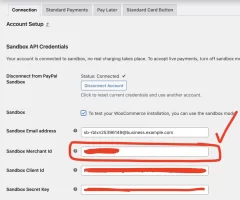
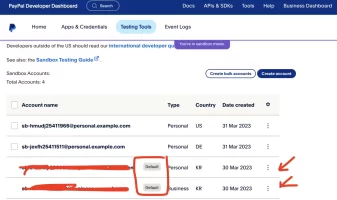
- Woocommerce settings: Check beforehand if your Woocommerce payment method supports your country. In my case, they did not support my country, so I set up a PayPal payment method instead. When setting up PayPal payment and testing the payment using sandbox, make sure to check out this tutorial. I wasted 6 hours trying to figure it out on my own. When you check the sandbox option, four input fields will appear. "Sandbox Merchant ID" can be found on your PayPal developer dashboard under Sandbox accounts. You will see one or two accounts labeled as default, which are merchant accounts. You can choose any of them and see the account ID, then copy and paste it. I hope this helps you save some time.
- Logo & images: I used Canva, imported templates, and modified them. I didn't waste much time creating a logo since I knew it didn't really matter when starting out.
- Copy: ChatGPT. When working on the copy, provide ChatGPT with detailed information about your needs. For example, specify the type of business you are creating a website for and the target audience. Write out the hero section headline and sub-headline.
- Google Tag Manager, Google Analytics, Google Ads: I think the best way is to use Google Tag Manager (later to run Google Ads). You can find a lot of tutorials on YouTube. However, if you want to save time configuring Google Analytics eCommerce tracking settings, watch this tutorial. He provides a container file(it's like a template), and you can import the file to your Google Tag Manager. It will save at least three hours. Google Ads conversion tracking + Google Tag Manager: this tutorial
- Optimization: Website speed is important. This plugin is gold: LiteSpeed. This tutorial taught me how to use the LiteSpeed plugin properly and additional website speed-up settings: link. Image size matters. I used this to compress images before upload: link. And also don't forget to optimize mobile-friendly.
* You will encounter a lot of errors, search on Google and YouTube. You will find a solution, but it will take time.
Thoughts:
When I started building a website, I didn't expect it would take one week. However, I believe the experiences and knowledge I gained during the process will enable me to complete my second website in less time. Now, I understand why people say to avoid perfectionism and just do it. I know these information is just for the preparation steps, but I hope it will help you save time.
Dislike ads? Become a Fastlane member:
Subscribe today and surround yourself with winners and millionaire mentors, not those broke friends who only want to drink beer and play video games. :-)
Access Restricted: Unlock 1,000,000+ Posts
Stop Peeking Through the Keyhole.
Open the Door.
You hit a wall because the best advice isn't free—it's earned. Since 2007, MJ DeMarco has been active here daily (99.9% active rate), building a war room for entrepreneurs who refuse to settle for mediocrity.
- Active Daily: Life-changing content posted dozens of times every day. No dead threads.
- MJ's Inner Circle: Direct access to the author of The Millionaire Fastlane.
- Vetted Network: Connect with founders scaling to 7 and 8 figures.
- Proven Roadmaps: Strategy over motivation. Execution over "hustle porn."
"SCALED TO 6-FIGURE MONTHS"
"Tips and advice here saved me from huge mistakes, others allowed me to scale my business to 6-figure months."— User MitchC
"INSANE QUALITY OF PEOPLE"
"The number of high quality people I've met from this forum has been insane. All of it predicated on building real value."— User Richard Peck
"You are the average of the five people you surround yourself with."
Are you surrounding yourself with success?




 hsiev vjsief