- Joined
- May 23, 2011
- Messages
- 1,164
Rep Bank
$2,285
$2,285
User Power: 124%
A lot of concepts from software engineering translate to configuring and managing your AI assistants and automation workflows.
So I thought maybe I could provide a bit of value here from a perspective of a dev, highly enthused with all this.
Disclaimer: I'm not saying it's "the" way to do things, or even a "correct" way. I'm also figuring this out as I go.
Step 1. "Where do I even start? Mac Mini or VPS? OpenClaw or Hermes? Self-hosted or cloud?"
You start with none of the above. Those are tools. Amazing tools. But you should first define what you want done, then pick tools accordingly.
So:
Step 2. Turn wishes into requirements (actually have AI do it)
Now that you know what you want, you need to get really specific about your requirements. AI can help with this.
So - take your wishlist (or project description) from step one, and ask AI to turn it into a PRD (Product Requirements Document).
Example prompt (attach to it your wishlist from Step 1):
Now...it may be good to read the resulting PRD before even addressing the follow-up questions. Because, you're now defining your business logic, requirements and constraints. And there's no single "correct" way to run a business. So if you leave it to AI to guess, guesses may be brilliant, but maybe not applicable to your business. Also, if you don't ask for something, it, oddly - may not get done.
Step 3: Let's start programming! (With zero code)
Now that you have your requirements sussed out, what's next?
Many folks seem to think of programming as writing code. It's not.
True programming is architecting a solution to a problem.
Code is just one way of implementing that solution. Visual no-code tools are another.
Proper programming actually starts with a flowchart. So let's see how your PRD looks when turned into one.
Example prompt (attach to it your PRD from Step 2):
Now, you should have a .html file which you can open in your browser, and see a flowchart, for example:
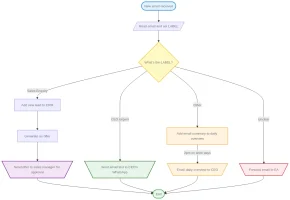
That flowchart - that's a program. Or better said - an algorithm. You could have sketched it on a napkin, taken a picture with your phone, and AI could work with that. The format doesn't matter. The logic does.
Here's how every program and automation works:
Some benefits of flowchart are that you can more easily:
While writing code is becoming something of a commodity, systems thinking is arguably becoming more valuable.
You now have an incredibly capable partner in AI. It can take your business to levels previously not comprehensible. But can be unpredictable at times. So the question becomes - not whether to use it - as your competitors definitely will (and already do). But - how to get the benefits, while managing the risks. I hope this gives you at least a bit of an edge
A few more concepts:
Backups: Something not done often enough
The easiest way to fix things if everything breaks is to have a full backup. Backups were always a must. But now that you are letting AI into your business, backups are a must must. You are a business owner trying to get an edge, and learning includes mistakes. But you can't afford to let those mistakes wipe out your live business.
Yet, if you restrict your AI too much, you lose the competitive advantage. So what to do?
Keep full, automated, redundant backups. Take the time to set it up once, and it will be worth your while.
Version Control
In professional software development, it's a way to track, log, and manage every single change made to code over time. Git is the most popular tool for this. For you as a business owner, it can be thought of as a sort-of-Undo option.
To be clear: it is not a literal Undo for your data. If your automation deletes customer records from your CRM, version control can't bring them back (that’s what backups are for).
But you should absolutely apply version control to the automation itself. Why? Because as you edit configuration files and code, there is a good chance things that previously worked will break. When that happens, version control allows you to easily revert to the last good version and try again.
Probabilistic vs. Deterministic
@Sirrom mentioned a friend whose AI sent payment to an incorrect recipient. Why did this happen? Because AI is probabilistic - it makes highly educated guesses, but it can still guess wrong.
For things that require 100% accuracy - like payments, database lookups, or matching invoices - you cannot rely on guesses. You need something deterministic. Which could be good old programming that stubbornly refuses to proceed if client_id and invoice_number don't match.
This is where you become a systems engineer. Look back at your flowchart. Where do you need 100% accuracy? Insert a deterministic guardrail there (like a hard-coded script or a human-in-the-loop approval step). Where do you need creative decision-making? Let AI shine.
So I thought maybe I could provide a bit of value here from a perspective of a dev, highly enthused with all this.
Disclaimer: I'm not saying it's "the" way to do things, or even a "correct" way. I'm also figuring this out as I go.
Step 1. "Where do I even start? Mac Mini or VPS? OpenClaw or Hermes? Self-hosted or cloud?"
You start with none of the above. Those are tools. Amazing tools. But you should first define what you want done, then pick tools accordingly.
So:
- Open your favourite text editor.
- Define what is it that you want done. You could write it out as a simple wishlist. Or like a project description with clear requirements. Both ways work.
Step 2. Turn wishes into requirements (actually have AI do it)
Now that you know what you want, you need to get really specific about your requirements. AI can help with this.
So - take your wishlist (or project description) from step one, and ask AI to turn it into a PRD (Product Requirements Document).
Example prompt (attach to it your wishlist from Step 1):
Code:
As a Senior Product Manager with expertise in AI systems and software development, your task is to transform my raw vision ("wishlist") into a detailed Product Requirements Document (PRD).

Your work will progress in phases through an iterative, conversational process.

STEP 1: ANALYSIS AND LOGICAL VALIDATION
First, carefully review my vision. Identify:
- Logical and conceptual contradictions.
- Missing and incomplete information (what is required for the system to actually work?).
- Potential technical or business risks (e.g., data privacy, AI hallucinations).

STEP 2: PRD FORMATION
Create a structured document that includes:
1. Project Goal and KPIs (How do we measure success?).
2. User Personas (Who is using the system?).
3. Functional Requirements (Detailed User Stories with acceptance criteria).
4. Non-Functional Requirements (Performance, Scalability, AI safety/security).
5. Edge Cases and Error Handling.

STEP 3: READINESS METRICS (The Traffic Light System)
At the end of every response, display the current readiness level of the PRD:
- Business Clarity: [X/100%]
- User Flow: [X/100%]
- Error Coverage: [X/100%]
- Technical Feasibility: [X/100%]

CONVERSATION AND FOLLOW-UP RULES:
- Do not just dump the PRD and stop. Ask me a maximum of 3-4 precise questions to fill in the blanks you identified in Step 1.
- Once all metrics in Step 3 exceed 90%, explicitly state: "The PRD looks complete and stable. All key business logic is defined. Would you like to lock this document and move on to creating and validating the Flowchart?"
- If I introduce a change in later iterations that breaks previously defined logic, warn me: "This change impacts [Section X]. To implement this, we must alter [Y]. Are you sure?"
- Ensure that every iteration builds upon the previous one without losing details we already agreed on.
- Keep it at the requirements level - what needs to happen, not how to build it. For example, 'Support 3 user roles with different permissions' is good. 'Use OAuth 2.0 for login' is not - that's for later.

My first message will be my initial vision. Begin with Step 1 and ask your first set of questions.
Now...it may be good to read the resulting PRD before even addressing the follow-up questions. Because, you're now defining your business logic, requirements and constraints. And there's no single "correct" way to run a business. So if you leave it to AI to guess, guesses may be brilliant, but maybe not applicable to your business. Also, if you don't ask for something, it, oddly - may not get done.
Step 3: Let's start programming! (With zero code)
Now that you have your requirements sussed out, what's next?
Many folks seem to think of programming as writing code. It's not.
True programming is architecting a solution to a problem.
Code is just one way of implementing that solution. Visual no-code tools are another.
Proper programming actually starts with a flowchart. So let's see how your PRD looks when turned into one.
Example prompt (attach to it your PRD from Step 2):
Code:
As a Systems Architect and QA Engineer, your task is to translate my attached PRD into a logically and technically flawless visual flowchart using Mermaid.js syntax. Refer strictly to the official documentation and standards found at https://github.com/mermaid-js/mermaid.

Your work must advance through these exact phases:

PHASE 1: LOGICAL FLOW VALIDATION (Pre-computation)
Before writing any diagram code, simulate the entire flow and verify:
- Every "Start" node (including scheduled cron jobs, webhooks, and event listeners) has a clear, reachable "End" node.
- Every decision point (including IF/ELSE conditions, loops, and multi-option branches) handles all potential paths and outcomes (e.g., successful API response, token expiration, user cancellation, system timeouts).
- All edge cases and error handling defined in my PRD are explicitly mapped.

PHASE 2: THE DIAGRAM HTML FILE
Generate the output as a single, self-contained HTML file block that I can download, save, and open in any browser.
This HTML file must include:
1. The Mermaid.js library script loaded via CDN.
2. The visual diagram code representing the workflow.

PHASE 3: COMPLETENESS CONFIRMATION (Follow-up rules)
Do not overwhelm me with text. At the end of your response, provide this exact footer:
"---
[FLOWCHART STATUS]: All paths successfully simulated. No errors found.

Please download the HTML file, open it in your browser, and review the visual structure.
- If you see any step that doesn't align with your business logic, point it out.
- If everything looks correct, reply with 'CONFIRM'. This will lock the Single Source of Truth (SSOT), and we will move to the technical requirements and shopping list phase."
Now, you should have a .html file which you can open in your browser, and see a flowchart, for example:
That flowchart - that's a program. Or better said - an algorithm. You could have sketched it on a napkin, taken a picture with your phone, and AI could work with that. The format doesn't matter. The logic does.
Here's how every program and automation works:
- It takes an input (an incoming email, a webhook, a button click...)
- Runs it through a set of rules (the algorithm)
- Produces an output (a quote sent to a client, meeting scheduled...)
Some benefits of flowchart are that you can more easily:
- See where data flows and decide what you want to process locally and what's safe to send to the cloud. Or where you need a heavy, expensive model, and where a cheaper one will do.
- Spot flaws (or opportunities) in your logic.
- Create a shopping list. Rather than guessing, you can bring the flowchart to LLM, and have it help you figure out exact server requirements, APIs and apps needed.
- Contextual bug fixing. When, not if, errors happen (welcome to programming - instead of trying one thing after another until something makes the error go away (but maybe breaks something else), having clear structure helps address this better.
While writing code is becoming something of a commodity, systems thinking is arguably becoming more valuable.
You now have an incredibly capable partner in AI. It can take your business to levels previously not comprehensible. But can be unpredictable at times. So the question becomes - not whether to use it - as your competitors definitely will (and already do). But - how to get the benefits, while managing the risks. I hope this gives you at least a bit of an edge
A few more concepts:
Backups: Something not done often enough
The easiest way to fix things if everything breaks is to have a full backup. Backups were always a must. But now that you are letting AI into your business, backups are a must must. You are a business owner trying to get an edge, and learning includes mistakes. But you can't afford to let those mistakes wipe out your live business.
Yet, if you restrict your AI too much, you lose the competitive advantage. So what to do?
Keep full, automated, redundant backups. Take the time to set it up once, and it will be worth your while.
Version Control
In professional software development, it's a way to track, log, and manage every single change made to code over time. Git is the most popular tool for this. For you as a business owner, it can be thought of as a sort-of-Undo option.
To be clear: it is not a literal Undo for your data. If your automation deletes customer records from your CRM, version control can't bring them back (that’s what backups are for).
But you should absolutely apply version control to the automation itself. Why? Because as you edit configuration files and code, there is a good chance things that previously worked will break. When that happens, version control allows you to easily revert to the last good version and try again.
Probabilistic vs. Deterministic
@Sirrom mentioned a friend whose AI sent payment to an incorrect recipient. Why did this happen? Because AI is probabilistic - it makes highly educated guesses, but it can still guess wrong.
For things that require 100% accuracy - like payments, database lookups, or matching invoices - you cannot rely on guesses. You need something deterministic. Which could be good old programming that stubbornly refuses to proceed if client_id and invoice_number don't match.
This is where you become a systems engineer. Look back at your flowchart. Where do you need 100% accuracy? Insert a deterministic guardrail there (like a hard-coded script or a human-in-the-loop approval step). Where do you need creative decision-making? Let AI shine.
Dislike ads? Become a Fastlane member:
Subscribe today and surround yourself with winners and millionaire mentors, not those broke friends who only want to drink beer and play video games. :-)
Access Restricted: Unlock 1,000,000+ Posts
Stop Peeking Through the Keyhole.
Open the Door.
You hit a wall because the best advice isn't free—it's earned. Since 2007, MJ DeMarco has been active here daily (99.9% active rate), building a war room for entrepreneurs who refuse to settle for mediocrity.
- Active Daily: Life-changing content posted dozens of times every day. No dead threads.
- MJ's Inner Circle: Direct access to the author of The Millionaire Fastlane.
- Vetted Network: Connect with founders scaling to 7 and 8 figures.
- Proven Roadmaps: Strategy over motivation. Execution over "hustle porn."
"SCALED TO 6-FIGURE MONTHS"
"Tips and advice here saved me from huge mistakes, others allowed me to scale my business to 6-figure months."— User MitchC
"INSANE QUALITY OF PEOPLE"
"The number of high quality people I've met from this forum has been insane. All of it predicated on building real value."— User Richard Peck
"You are the average of the five people you surround yourself with."
Are you surrounding yourself with success?