- Joined
- Dec 21, 2015
- Messages
- 89
Rep Bank
$305
$305
User Power: 29%
I'm having a problem with optimizepress (on Wordpress.org 4.4.2) & Hostgator. It's a very specific problem which I'm going to try to describe as clearly as possible. I'm hoping that someone who knows exactly what I'm talking about will be able to help.
I'm building a membership site. I have 1 product so far. I've set up most of it, but right now I'm trying to get the files that make up my product onto wordpress.
I can't upload them onto the media library directly because my files are huge. So I've uploaded them onto the cpanel of hostgator.
At first, after I uploaded them, I couldn't figure out how to make them appear in the media library. But then I found out about a plugin called Media From FTP and I managed to do it, by clicking on Search & Register. No problem.
But then, as I was watching various videos on how to set up optimizepress, one of them said that I need to protect not only the pages where my files would be, but also the files themselves.
The way to do this is to go to Optimizemember > Download Options > Basic download Restrictions.
Here's what it says there :
- - - - -
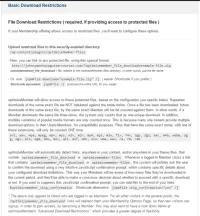
Upload restricted files to this security-enabled directory:
/wp-content/plugins/optimizeMember-files
- Now, you can link to any protected file, using this special format:
http://mysite.com/?optimizemember_file_download=example-file.zip
optimizemember_file_download = file, relative to the /optimizeMember-files/ directory. In other words, just the file name.
- Or, use: [opmFile download="example-file.zip" /] ( easier Shortcode if you prefer )
Shortcode equivalent: [opmFile /] produces the entire URL for you, easier.
- - - - -
So, I had to move my files into a special folder for them to be protected.
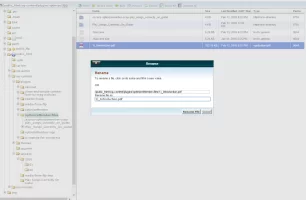
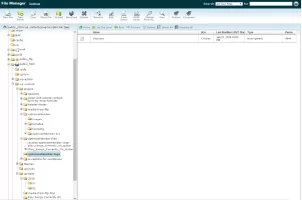
My files were originally in the /wp-content folder. So, I went into the plugins folder, then the optimizeMember-files folder, and then I created another folder named after my course, plus other folders inside that, in order to organize my files.
So, then I went into the Media From FTP plugin, to get my files into the media library. But when I tried, it only lets me search in the /wp-content/uploads folder (as well as whatever folders are in that one).
So I can't access my files. As far as I can see I have only 1 option, which is to move my files into the uploads folder. This would work, but it would be unacceptable because the files wouldn't be protected. I need them in the protected folder (optimizeMember-files) and I need to get to them from the plugin so I can put them in the media library.
And that's my problem. For days I've tried and tried to get an answer but I've come across nothing. If you're reading this and you know what I'm on about, what should I do? Most of my site is done apart from some tweaking, but this is really slowing me down.
Thanks.
I'm building a membership site. I have 1 product so far. I've set up most of it, but right now I'm trying to get the files that make up my product onto wordpress.
I can't upload them onto the media library directly because my files are huge. So I've uploaded them onto the cpanel of hostgator.
At first, after I uploaded them, I couldn't figure out how to make them appear in the media library. But then I found out about a plugin called Media From FTP and I managed to do it, by clicking on Search & Register. No problem.
But then, as I was watching various videos on how to set up optimizepress, one of them said that I need to protect not only the pages where my files would be, but also the files themselves.
The way to do this is to go to Optimizemember > Download Options > Basic download Restrictions.
Here's what it says there :
- - - - -
Upload restricted files to this security-enabled directory:
/wp-content/plugins/optimizeMember-files
- Now, you can link to any protected file, using this special format:
http://mysite.com/?optimizemember_file_download=example-file.zip
optimizemember_file_download = file, relative to the /optimizeMember-files/ directory. In other words, just the file name.
- Or, use: [opmFile download="example-file.zip" /] ( easier Shortcode if you prefer )
Shortcode equivalent: [opmFile /] produces the entire URL for you, easier.
- - - - -
So, I had to move my files into a special folder for them to be protected.
My files were originally in the /wp-content folder. So, I went into the plugins folder, then the optimizeMember-files folder, and then I created another folder named after my course, plus other folders inside that, in order to organize my files.
So, then I went into the Media From FTP plugin, to get my files into the media library. But when I tried, it only lets me search in the /wp-content/uploads folder (as well as whatever folders are in that one).
So I can't access my files. As far as I can see I have only 1 option, which is to move my files into the uploads folder. This would work, but it would be unacceptable because the files wouldn't be protected. I need them in the protected folder (optimizeMember-files) and I need to get to them from the plugin so I can put them in the media library.
And that's my problem. For days I've tried and tried to get an answer but I've come across nothing. If you're reading this and you know what I'm on about, what should I do? Most of my site is done apart from some tweaking, but this is really slowing me down.
Thanks.
Dislike ads? Become a Fastlane member:
Subscribe today and surround yourself with winners and millionaire mentors, not those broke friends who only want to drink beer and play video games. :-)
Access Restricted: Unlock 1,000,000+ Posts
Stop Peeking Through the Keyhole.
Open the Door.
You hit a wall because the best advice isn't free—it's earned. Since 2007, MJ DeMarco has been active here daily (99.9% active rate), building a war room for entrepreneurs who refuse to settle for mediocrity.
- Active Daily: Life-changing content posted dozens of times every day. No dead threads.
- MJ's Inner Circle: Direct access to the author of The Millionaire Fastlane.
- Vetted Network: Connect with founders scaling to 7 and 8 figures.
- Proven Roadmaps: Strategy over motivation. Execution over "hustle porn."
"SCALED TO 6-FIGURE MONTHS"
"Tips and advice here saved me from huge mistakes, others allowed me to scale my business to 6-figure months."— User MitchC
"INSANE QUALITY OF PEOPLE"
"The number of high quality people I've met from this forum has been insane. All of it predicated on building real value."— User Richard Peck
"You are the average of the five people you surround yourself with."
Are you surrounding yourself with success?