Hey, for a while I have been thinking of making a list of chrome extensions that I use every day and help me be a much better and more efficient entrepreneur.
I hope some of this work for you as well as they work for me.
1. Tactiq - bit.ly/3MbQZPi
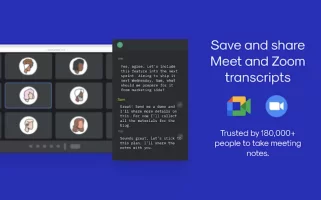
Transcribe everything you say in a meeting, be it on Meet or Zoom. You can identify which person each message is from and even export the entire minute in a Google doc.
2. Blackbox - bit.ly/3NewWBf
With this tool, you can copy any text from the internet. From the text of a YouTube video to the text of an image. If you program it is very useful to copy the code of any video tutorial.
3. Hunter - bit.ly/3Ng46k0
Looking for someone's email?
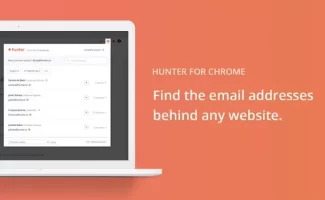
You put the domain of the company you want and it automatically brings you 1 email with its terminology.
Ex: [email protected]; Then you search on LinkedIn and you can write to any employee of that company .
4. LanguageTool - bit.ly/3mad32t
A perfect spelling assistant. This tool runs over your entire website. It will highlight all errors and suggest corrections.
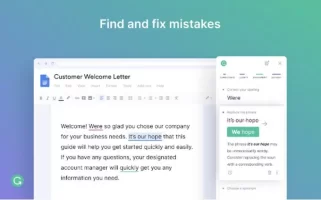
5. Grammarly - bit.ly/3NeeNUi
Ideal if you write in English and work in the IT world. This tool helps you correct your grammar, and recommends the best way to recite a sentence or correctly convey what you want. They haven't added the Spanish language yet.
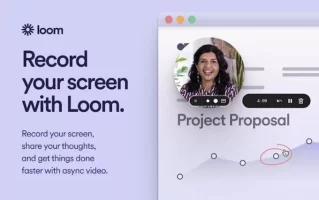
6. Loom - https://bit.ly/3tdI0qu
A great tool to record your entire screen. It also records audio. You can record your screen alone, screen + webcam, and more.
7. Picture in picture - https://bit.ly/3GHgbw4
This tool is great if you want to watch a video while you work on something else. Very useful to watch tutorials and practice in real-time or also to have the video you want as a thumbnail.
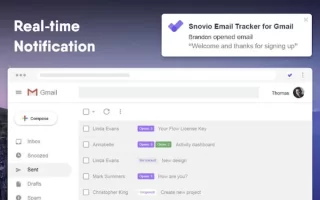
8. Unlimited Email Tracker - https://bit.ly/3x5L74T
Toxic Alert ⚠️
With this tool you can track all the emails you send. It notifies you in real-time if the email you sent was opened. You can also track the links you send. Toxic but useful.
9. Scribe - bit.ly/3GJhxqf
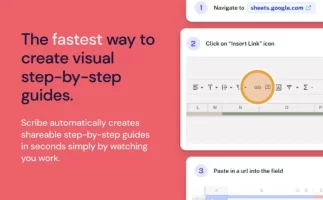
This tool is ideal for creating tutorials. You simply record your PC screen and it automatically generates a step-by-step of everything you did .
10. Todoist - bit.ly/3GHkVlm
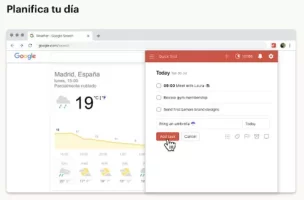
Excellent tool for planning your tasks. Very practical and easy to use. You can add links, build funnels, and much more. Is fantastic.
Let me know what you think of this or if anyone has another tool to recommend!
I hope some of this work for you as well as they work for me.
1. Tactiq - bit.ly/3MbQZPi
Transcribe everything you say in a meeting, be it on Meet or Zoom. You can identify which person each message is from and even export the entire minute in a Google doc.
2. Blackbox - bit.ly/3NewWBf
With this tool, you can copy any text from the internet. From the text of a YouTube video to the text of an image. If you program it is very useful to copy the code of any video tutorial.
3. Hunter - bit.ly/3Ng46k0
Looking for someone's email?
You put the domain of the company you want and it automatically brings you 1 email with its terminology.
Ex: [email protected]; Then you search on LinkedIn and you can write to any employee of that company .
4. LanguageTool - bit.ly/3mad32t
A perfect spelling assistant. This tool runs over your entire website. It will highlight all errors and suggest corrections.
5. Grammarly - bit.ly/3NeeNUi
Ideal if you write in English and work in the IT world. This tool helps you correct your grammar, and recommends the best way to recite a sentence or correctly convey what you want. They haven't added the Spanish language yet.
6. Loom - https://bit.ly/3tdI0qu
A great tool to record your entire screen. It also records audio. You can record your screen alone, screen + webcam, and more.
7. Picture in picture - https://bit.ly/3GHgbw4
This tool is great if you want to watch a video while you work on something else. Very useful to watch tutorials and practice in real-time or also to have the video you want as a thumbnail.
8. Unlimited Email Tracker - https://bit.ly/3x5L74T
Toxic Alert ⚠️
With this tool you can track all the emails you send. It notifies you in real-time if the email you sent was opened. You can also track the links you send. Toxic but useful.
9. Scribe - bit.ly/3GJhxqf
This tool is ideal for creating tutorials. You simply record your PC screen and it automatically generates a step-by-step of everything you did .
10. Todoist - bit.ly/3GHkVlm
Excellent tool for planning your tasks. Very practical and easy to use. You can add links, build funnels, and much more. Is fantastic.
Let me know what you think of this or if anyone has another tool to recommend!
Dislike ads? Become a Fastlane member:
Subscribe today and surround yourself with winners and millionaire mentors, not those broke friends who only want to drink beer and play video games. :-)
Access Restricted: Unlock 1,000,000+ Posts
Stop Peeking Through the Keyhole.
Open the Door.
You hit a wall because the best advice isn't free—it's earned. Since 2007, MJ DeMarco has been active here daily (99.9% active rate), building a war room for entrepreneurs who refuse to settle for mediocrity.
- Active Daily: Life-changing content posted dozens of times every day. No dead threads.
- MJ's Inner Circle: Direct access to the author of The Millionaire Fastlane.
- Vetted Network: Connect with founders scaling to 7 and 8 figures.
- Proven Roadmaps: Strategy over motivation. Execution over "hustle porn."
"SCALED TO 6-FIGURE MONTHS"
"Tips and advice here saved me from huge mistakes, others allowed me to scale my business to 6-figure months."— User MitchC
"INSANE QUALITY OF PEOPLE"
"The number of high quality people I've met from this forum has been insane. All of it predicated on building real value."— User Richard Peck
"You are the average of the five people you surround yourself with."
Are you surrounding yourself with success?