This is a guide that will be done in multiple parts.
Introduction
In the world of AI things change on a dime. But we're basically at a point where 99% of the work of ads management can be done by AI.
Having AI run ads for you is one of the few ways AI can make you money directly.
Some of you know that my business is an ads management agency, focused on Meta ads. I've managed spends from $5 a day to $38,000 a day, and everywhere in between.
Since September I've not had to do all that much in Ads Manager despite having 13 accounts under management now. Why?
Muse AI.
Muse is an AI agent product sold by Meta. Functionally, it's similar to Grok Bot in a lot of ways. It's pitched as a personal AI agent for everybody.
But I haven't been using it that way.
I've been using it as an agent with my clients' Meta ads accounts. I have it build out entire campaigns for me, from scratch, using only plain text.
Do you need Muse in order to do this?
NO!
You can do it with Claude or ChatGPT. There is no secret functionality Muse offers, aside from the Meta for Business connector being easier to set up.
But, if you’re not using any Meta ads AI right now, Muse is free to use (limited tokens) for US, Japan, Singapore, and Canada, soon to be offered in more countries.
I use Muse so that I don’t have to pay for other tokens. Actions in Ads Manager are not particularly token intensive.
The reason you might want to get started with Muse now is because there’s no telling what Meta will do with its MCP server. It might shut it down or restrict access. It might charge for API access. Muse is a Meta product that will likely be integrated into Meta Business suite.
But you are in no way obligated to use Muse for this. Muse is not smarter or more capable than other AI agents. It uses Meta's Spark model family, which is not exactly top of the line.
It turns out, though, the model is plenty good enough.
This guide provides prompts you can use. Copy them and paste them in Muse.
Sometimes, things break. But it’ll work if you keep troubleshooting it. Some basic "solves" include starting a new conversation, giving it more context, and possibly just asking a smarter model like Fable, Astra, or Opus.
This isn’t theory: I’m RUNNING THESE THINGS in my business for over a dozen clients. I'm telling you my workflow.
My workflow is IMPERFECT. This is not meant to be authoritative. Set it up yourself, hook it up to the things you're using, and try it for yourself.
How to Get Started
Go to Muse — Your Personal AI Agent and sign in with your Meta account.
You'll be set up with your agent where you'll give it a name and an avatar. My guy's avatar is the Demon Butler from Old School Runescape. If you know, you know, and your wrist probably hurts.
It'll suggest a bunch of things for you, but don't bother with any of them. There's only a few things you actually need to make this work as written.
Connectors (The Bare Minimum)
Meta Business Manager: this is the connector that interfaces with your business suite, your ad accounts, your pixel, and more. Here are all the permissions it gives you:
Reads
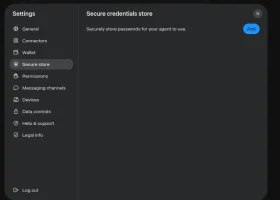
Google Drive (and Docs & Sheets as well): this is where your agent's long term memory & audit trail will go. This works even better if your other agents also have access to the same Drive.
Other connectors:
I will split this into multiple posts including:
Your First Step: Connecting Your Account & Setting Up Uptime Polling
Muse operates on a 30 minute heartbeat cycle. Every 30 minutes, Muse will check back.
One thing that you will notice, as you get to using Muse, is that it will start recommending things pretty constantly FOR YOU, without being prompted to do it. It proactively warns you about things, proactively suggests changes, and will sometimes find opportunities.
Your first step is to use a daily scheduled task that will tell you how much you've spent, how many results you've gotten, and how that differs from the 7-day and 30-day average.
Tell Muse this, filling in the details:
This is not a perfect prompt. But that's okay. The first step is to know.
Second post will be about using Muse's web agent to do ads research automatically on a regular clip using Scheduled Tasks.
Introduction
In the world of AI things change on a dime. But we're basically at a point where 99% of the work of ads management can be done by AI.
Having AI run ads for you is one of the few ways AI can make you money directly.
Some of you know that my business is an ads management agency, focused on Meta ads. I've managed spends from $5 a day to $38,000 a day, and everywhere in between.
Since September I've not had to do all that much in Ads Manager despite having 13 accounts under management now. Why?
Muse AI.
Muse is an AI agent product sold by Meta. Functionally, it's similar to Grok Bot in a lot of ways. It's pitched as a personal AI agent for everybody.
But I haven't been using it that way.
I've been using it as an agent with my clients' Meta ads accounts. I have it build out entire campaigns for me, from scratch, using only plain text.
Do you need Muse in order to do this?
NO!
You can do it with Claude or ChatGPT. There is no secret functionality Muse offers, aside from the Meta for Business connector being easier to set up.
But, if you’re not using any Meta ads AI right now, Muse is free to use (limited tokens) for US, Japan, Singapore, and Canada, soon to be offered in more countries.
I use Muse so that I don’t have to pay for other tokens. Actions in Ads Manager are not particularly token intensive.
The reason you might want to get started with Muse now is because there’s no telling what Meta will do with its MCP server. It might shut it down or restrict access. It might charge for API access. Muse is a Meta product that will likely be integrated into Meta Business suite.
But you are in no way obligated to use Muse for this. Muse is not smarter or more capable than other AI agents. It uses Meta's Spark model family, which is not exactly top of the line.
It turns out, though, the model is plenty good enough.
This guide provides prompts you can use. Copy them and paste them in Muse.
Sometimes, things break. But it’ll work if you keep troubleshooting it. Some basic "solves" include starting a new conversation, giving it more context, and possibly just asking a smarter model like Fable, Astra, or Opus.
This isn’t theory: I’m RUNNING THESE THINGS in my business for over a dozen clients. I'm telling you my workflow.
My workflow is IMPERFECT. This is not meant to be authoritative. Set it up yourself, hook it up to the things you're using, and try it for yourself.
How to Get Started
Go to Muse — Your Personal AI Agent and sign in with your Meta account.
You'll be set up with your agent where you'll give it a name and an avatar. My guy's avatar is the Demon Butler from Old School Runescape. If you know, you know, and your wrist probably hurts.
It'll suggest a bunch of things for you, but don't bother with any of them. There's only a few things you actually need to make this work as written.
Connectors (The Bare Minimum)
Meta Business Manager: this is the connector that interfaces with your business suite, your ad accounts, your pixel, and more. Here are all the permissions it gives you:
Reads
- Accounts, campaigns, ad sets, ads, and their statuses — plus spend and results
- Creatives, ad images/videos, ad previews
- Insights: performance trends, anomaly signals, auction ranking / industry benchmarks, performance vs peers, opportunity score
- Catalogs, product feeds, product sets, products, diagnostics and DPA eligibility
- Custom audiences, datasets / pixels and pixel events, custom conversions
- Pages for the business, user Pages, Instagram accounts and media
- Ad Library search, help articles, policy checks, metric definitions, errors, and account activity logs
- Create campaigns, ad sets, ads, and creatives — plus upload media and create image variations
- Update and activate entities, update/delete creatives
- Create/update/delete custom audiences, catalogs, feeds, products, datasets, and pixel events
- Create/update A/B and lift experiments, and boost an Instagram post
- No tool that reads comment text on a specific ad — comment counts still come through insights, but not the text itself
- No billing tools — no balance owed, payments, invoices, spending limits, or ad credits
- No automated rules creation
Google Drive (and Docs & Sheets as well): this is where your agent's long term memory & audit trail will go. This works even better if your other agents also have access to the same Drive.
Other connectors:
- Shopify
- Canva (for editing ads)
- Gmail (notifications)
- Whatsapp (notifications)
- HighLevel (if you use it)
- Klaviyo (if you use it)
- Zapier (only if necessary to connect your CRM, Zapier is less and less necessary now)
- Slack (for inter-agent communication)
- Stripe (advanced users only)
I will split this into multiple posts including:
- Ad research
- Ad ideation & briefs
- Copy generation (body copy, headlines, descriptions)
- Image and video generation from briefs
- Landing page testing using the browser agent (does everything work, does the pixel work, etc)
- Setting up the campaigns, ad sets, and ads
- Fixing mistakes (or Why You Shouldn't Fire Your Ads Freelancer Just Yet)
- Reporting, daily/weekly/monthly, sent to wherever you want it (even if you want Claude to do it)
- Managing comments & doing voice-of-customer analysis (NOTE: requires a custom connector)
Your First Step: Connecting Your Account & Setting Up Uptime Polling
Muse operates on a 30 minute heartbeat cycle. Every 30 minutes, Muse will check back.
One thing that you will notice, as you get to using Muse, is that it will start recommending things pretty constantly FOR YOU, without being prompted to do it. It proactively warns you about things, proactively suggests changes, and will sometimes find opportunities.
Your first step is to use a daily scheduled task that will tell you how much you've spent, how many results you've gotten, and how that differs from the 7-day and 30-day average.
Tell Muse this, filling in the details:
Set up Meta ads monitoring for my ad account. This is read-only monitoring only — never pause, activate, delete, or change budgets, bids, ads, campaigns, or rules.
MY ACCOUNT:
- Ad account name: [e.g. My Business]
- Ad account ID: [act_123456789 — or ask Muse to list my accounts and confirm this is the right one]
- Currency: [e.g. CAD / USD / GBP]
- Account timezone: [e.g. America/Toronto]
- Normal zero-spend days: [e.g. none — any $0 day is a problem / Sundays are normally $0]
- Where to send reports/alerts: [in this Muse chat / by email to ___ / in Slack #___]
- Daily report time: [e.g. 8:30am my time]
CONNECTORS TO USE:
- Use the Meta Business Manager connector (meta_ads) for all Meta reads.
- Do NOT use browser automation to log in to facebook.com.
- If a read I need is not in the live meta_ads tool list, tell me — do not guess a tool name or switch routes without asking.
1) DAILY SPEND TRACKING
- Build a small read-only script and a daily scheduled job at the time above.
- Every morning, pull YESTERDAY'S spend at account level, for yesterday in the ACCOUNT'S timezone.
- Report: yesterday's date, spend in the account currency, and whether it was normal.
- Alert me if: a) spend was $0 and that was not a normal zero-spend day, or b) spend was more than 2x my expected daily spend, or more than 2x my 7-day average, or c) the spend could not be read.
- Never invent a number. If a fetch fails, say "could not read spend" and why.
- Log each run locally. Show me the script, the cron time, and run a one-off test for yesterday before you finish.
2) AD ACCOUNT UPTIME POLLING
- Build a second read-only check that runs every 30 minutes during my live hours.
- On each run, check these 5 things:
1. ad_status — account_status, and counts of ACTIVE vs PAUSED campaigns and ads
2. ad_spend_today — insights spend for TODAY in the account's timezone. A successful call returning NO rows means $0 spend — record it as 0. A FAILED fetch is different — record it as blank, never as 0.
3. ad_account_payment — account_status + disable_reason (e.g. billing hold / UNSETTLED)
4. ad_disapprovals — count of ads DISAPPROVED or WITH_ISSUES
5. spend_limit_headroom — spend_cap + amount_spent, exactly as Meta returns them
- Stay silent on success — do not message me every 30 minutes.
- Alert me IMMEDIATELY if: account_status is not ACTIVE, spend is still $0 by [e.g. 10am] on a day ads should be live, a new disapproved ad appears, a billing hold appears, or 2 fetch failures happen in a row.
- Send ONE short daily summary at 8am: account status, spend today so far, active ads, and any disapprovals — or "all clear".
- Never invent a value for a missed run, and do not retry out of schedule.
- Show me the poller location, its schedule, and run a one-off test now to prove all 5 checks return real values.
If there's anything you're unsure of, ask me before building.
FINISH BY TELLING ME:
- What you built, where the files/scripts live, the exact cron times, and what the next report/summary will say.
- What you could NOT verify (e.g. billing details are not visible via the API).
This is not a perfect prompt. But that's okay. The first step is to know.
Second post will be about using Muse's web agent to do ads research automatically on a regular clip using Scheduled Tasks.
Dislike ads? Become a Fastlane member:
Subscribe today and surround yourself with winners and millionaire mentors, not those broke friends who only want to drink beer and play video games. :-)
Access Restricted: Unlock 1,000,000+ Posts
Stop Peeking Through the Keyhole.
Open the Door.
You hit a wall because the best advice isn't free—it's earned. Since 2007, MJ DeMarco has been active here daily (99.9% active rate), building a war room for entrepreneurs who refuse to settle for mediocrity.
- Active Daily: Life-changing content posted dozens of times every day. No dead threads.
- MJ's Inner Circle: Direct access to the author of The Millionaire Fastlane.
- Vetted Network: Connect with founders scaling to 7 and 8 figures.
- Proven Roadmaps: Strategy over motivation. Execution over "hustle porn."
"SCALED TO 6-FIGURE MONTHS"
"Tips and advice here saved me from huge mistakes, others allowed me to scale my business to 6-figure months."— User MitchC
"INSANE QUALITY OF PEOPLE"
"The number of high quality people I've met from this forum has been insane. All of it predicated on building real value."— User Richard Peck
"You are the average of the five people you surround yourself with."
Are you surrounding yourself with success?